
Home > Bar code Fonts > UPC Bar Codes




Windows 11 - 10, Server 2022/19/16, 32 or 64 bit,
laser or inkjet printer
Download now

3.2 Mbytes, V8.0
Download, multiple users
plus embeddable option


Print an order form

Terms & Conditions

Elfring Fonts, Inc.
4N899 W Mary Dr
St Charles, IL 60175
Phone Orders:
1-630-440-2456
UPC Bar code Generator
 UPC bar codes, (Universal Product Code), are required on all retail packaging in North America (United States and Canada). The only exceptions are for books and pharmaceuticals, each of which has its own special bar code symbology. UPC bar codes are a unique 12 digit number that identifies one specific product. All UPC numbers are assigned by GS1. If GS1 UPC numbers is too expensive for you, you should try My Bar Code Store to purchase UPC number assignments for as little as $20 each.
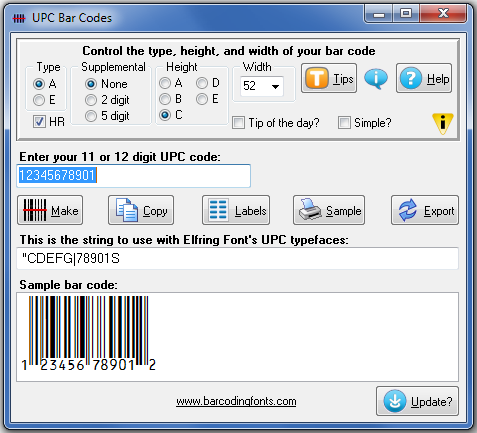
UPC bar code software. The quickest & simplest way to generate your own bar code it to use the UPC Generator shown here. Simply enter any UPC bar code number (with or without a checksum) into the program and click Make to build a bar code. This program will generate a guaranteed scannable UPC bar code for you. Print as few or as many bar codes as you want, on labels, in packaging, or as a graphic image. You manipulate both the height and width of the bar code you want to print separately- sizing it the way you want.
Sheet label printing. Would you like to print sheets of UPC codes, using standard Avery labels? Our generator makes this easy. Enter any UPC number, generate a bar code, and select the Print Labels function. Then pick the size of the label you want for your UPC code. These label templates include all standard label sizes. Your label template will be visible in your Word processor, where you place your bar code plus any text or even graphics. UPC bar codes can range in size from 1.0 x .25 to 1.5 x 1 in size (width x height).
Making bar code images. Occasionally you need the ability to send your bar code to someone else. You usually need an image file in gif, jpg, or png formats. This bar code generator will export your UPC code in any of these formats. You can choose one of four different resolutions including 300, 600, 900, and 1200 dpi. The UPC generator lets you modify both the height and the width of the UPC bar code you are creating.
Creating lots of bar codes. This package includes Visual Basic macros that run inside Excel, Access, or Word to build large numbers of UPC codes. For example, add our macros to Excel and you can create a cell with a new formula that generates a UPC bar code directly from your data. You can create thousands of UPC bar codes all at once in your spread sheet.
- UPC Symbologies: UPC-A, UPC-E, plus 2 and 5 digit supplemental codes
- UPC Data Type: Numbers only
- UPC Checksum: Required
- UPC Length: Fixed (6 or 12 digits, with optional 2 and 5 digit supplemental)
- Graphic Image Formats: bmp, gif, jpg, png at 300, 600, 900, & 1200 dpi
- Includes: five height/width ratios of each bar code font
- Font Types: TrueType (in OpenType format) and PC PostScript
- Additional Requirements: Laserjet or inkjet printer, minimum of 300 dpi resolution
- Compatible Software: Word, Excel, Access, FoxPro, Illustrator, PageMaker, Quark Express, Corel Draw, plus hundreds more.
- Embedding: This retail font set will not embed in a pdf file. An embeddable font set is available but requires a special embedding license.